Document AI Is a Pipeline, Not One LLM Call
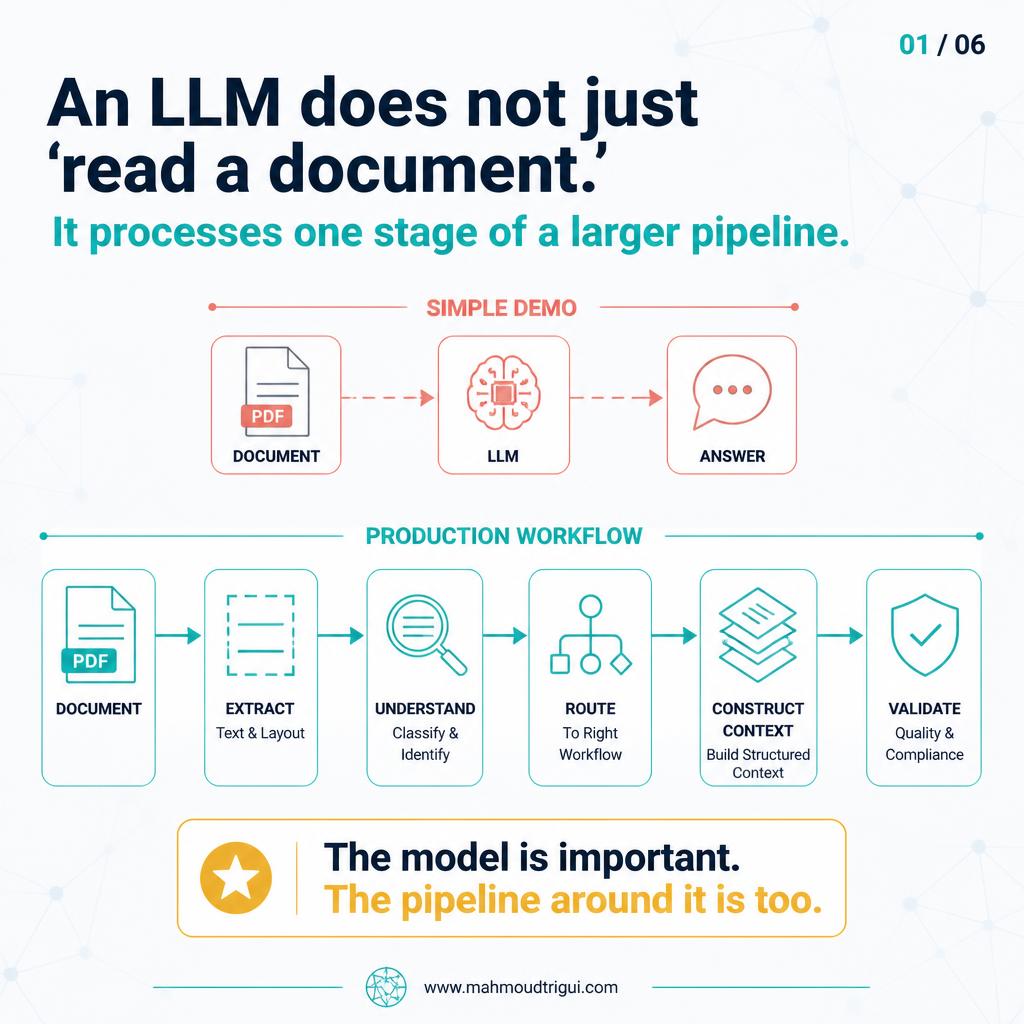
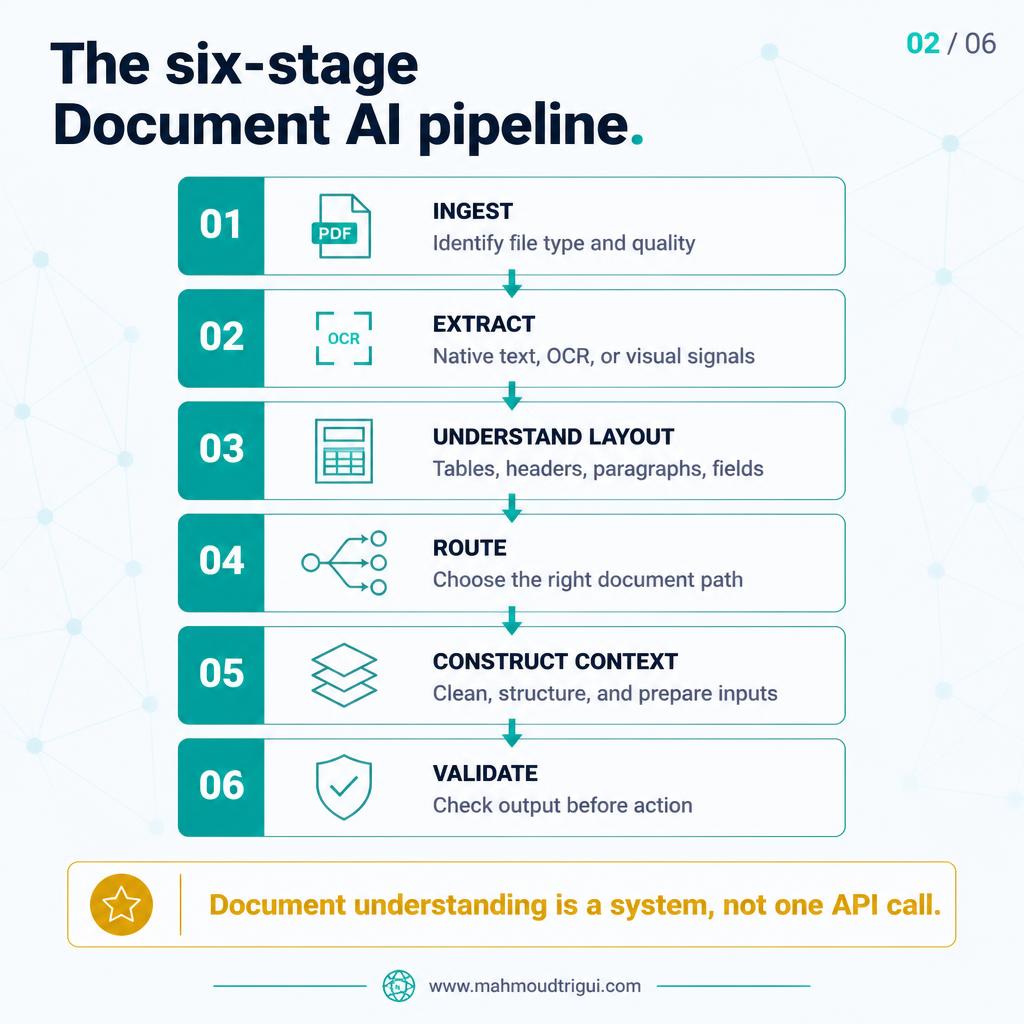
In production, document understanding is a six-stage pipeline — ingest, extract, understand layout, route, build context, validate — and the model is only one of them.
TL;DR: Document understanding is a pipeline, not a model call. Most Document AI failures are created before the LLM is ever invoked: poor source quality, wrong OCR, lost table structure, incorrect routing, and incomplete context. In production the model matters, but the stages around it — ingest, extract, understand layout, route, construct context, validate — decide whether its answer can be trusted at all.
Visual Summary
The Problem
The sentence I keep hearing is “the LLM reads the document.” It is a useful shortcut for a demo, and it hides the part that decides whether the result can be trusted. In the systems I have worked around, document understanding was never a single call. It was a pipeline, and most of the work happened before any model was invoked.
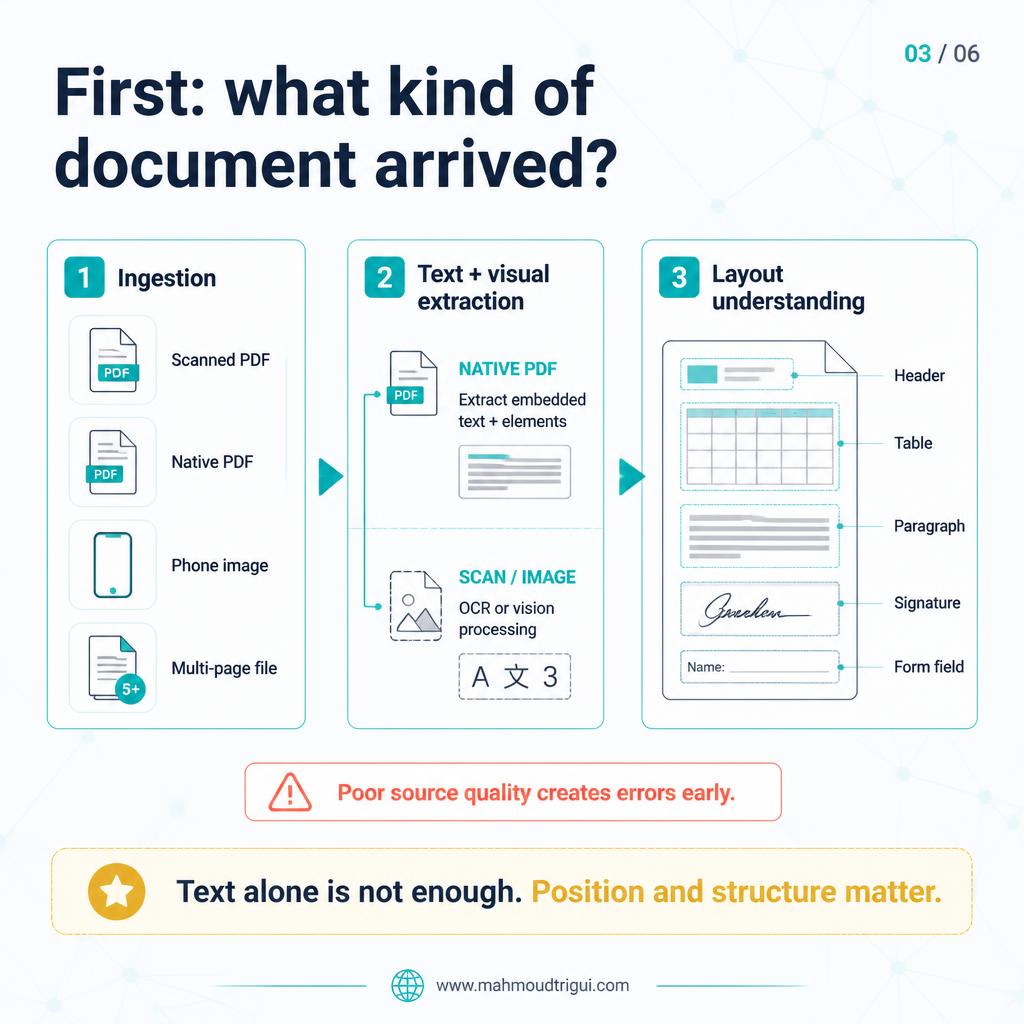
A document arrives as a scanned PDF, a native PDF with embedded text, a photographed form, a multi-page contract, a table-heavy invoice, or a page carrying handwriting, stamps and signatures. Each of those creates a different processing decision. Native text does not need OCR. A skewed phone photo does. A table is not a paragraph, and a signature block is not a form field. If the pipeline treats them as interchangeable, the extraction is already wrong before the model has said anything.
The Approach
So when I design a Document AI workflow, I stop asking which model to use and start naming the stages. Six of them carry almost all of the reliability, and each one is a decision I can defend:
1. Ingest and identify the format
Before extracting anything, establish what actually arrived: file type, page count, whether the text is embedded or the page is an image, and whether the scan is skewed, truncated or too low-resolution. Cheap checks here prevent expensive work later, and a document that fails the quality check should be flagged now rather than turned into a confident wrong answer.
2. Extract text and visual signals
Use native text extraction when the PDF carries it, and reserve OCR or vision processing for scans, photographs and images. Running OCR over a clean native PDF is slower and usually less accurate than reading the text that is already there, and it is the most common avoidable mistake I see in this stage.
3. Understand the layout
Headers, paragraphs, tables, key-value pairs, signatures and page structure are different objects, not different formatting of the same text. A table flattened into a paragraph loses the row-column relationship that made it a table, and every later question about a total or a line item becomes guesswork.
4. Route the document
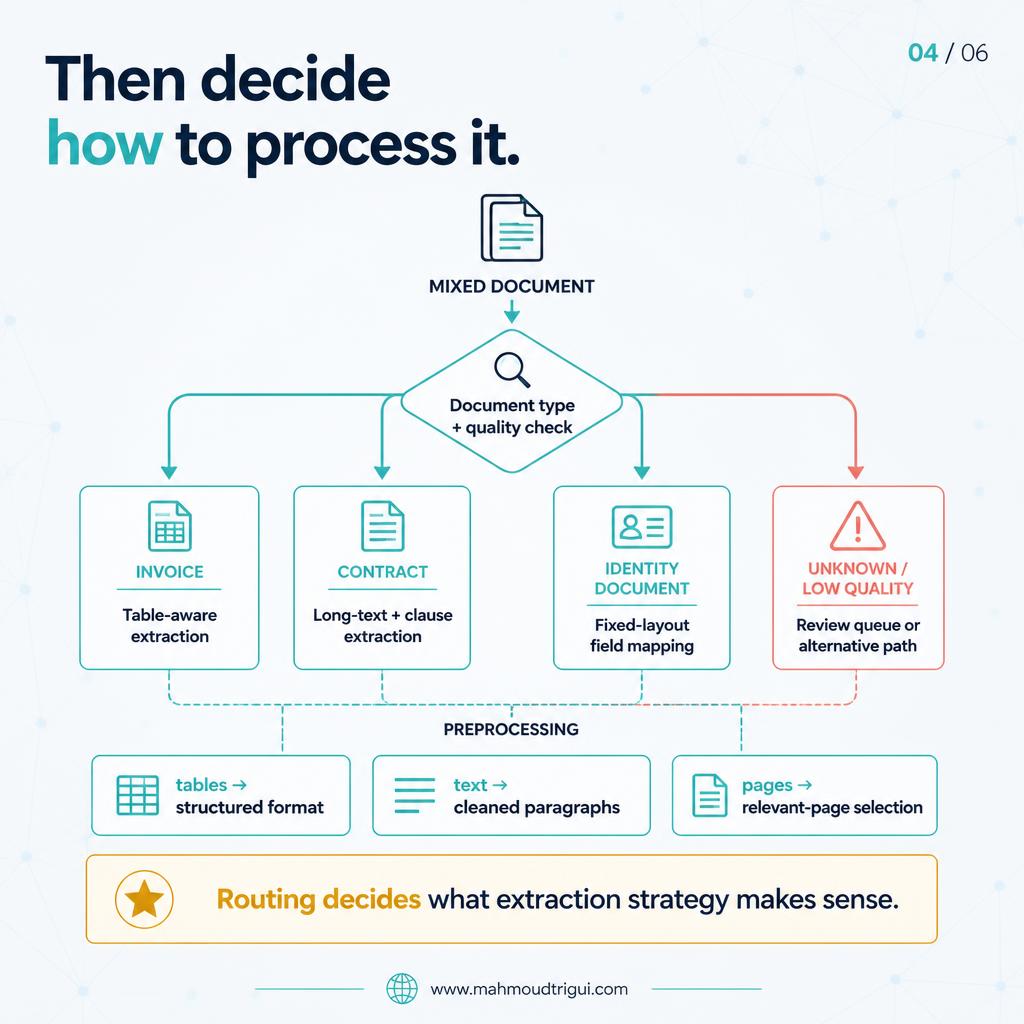
An invoice, a contract, an identity document and a letter do not share an extraction strategy. Routing on document type and quality decides which logic runs, and unknown or low quality has to be a real, valid outcome that goes to a review queue rather than a silent default.
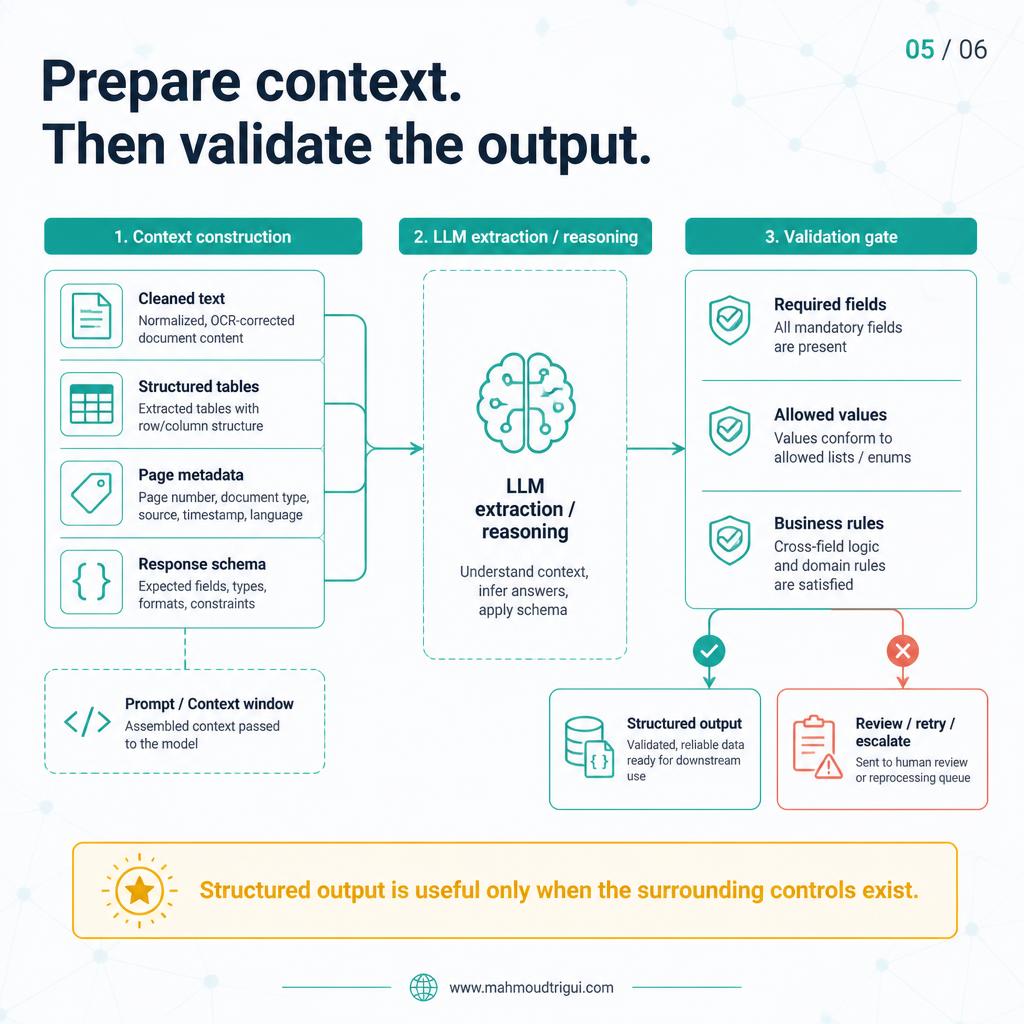
5. Construct the model context
Clean the text, preserve the useful table structure, attach the page metadata, and define the expected output schema before the call is made. Most of what gets reported as the model got it wrong is really an incomplete-context report.
6. Validate the result
Check the required fields, apply the business rules, and route uncertain or high-risk cases to human review. Structured output is only useful when something verifies it: a JSON object that was never validated is a guess wearing a schema.
Outcome
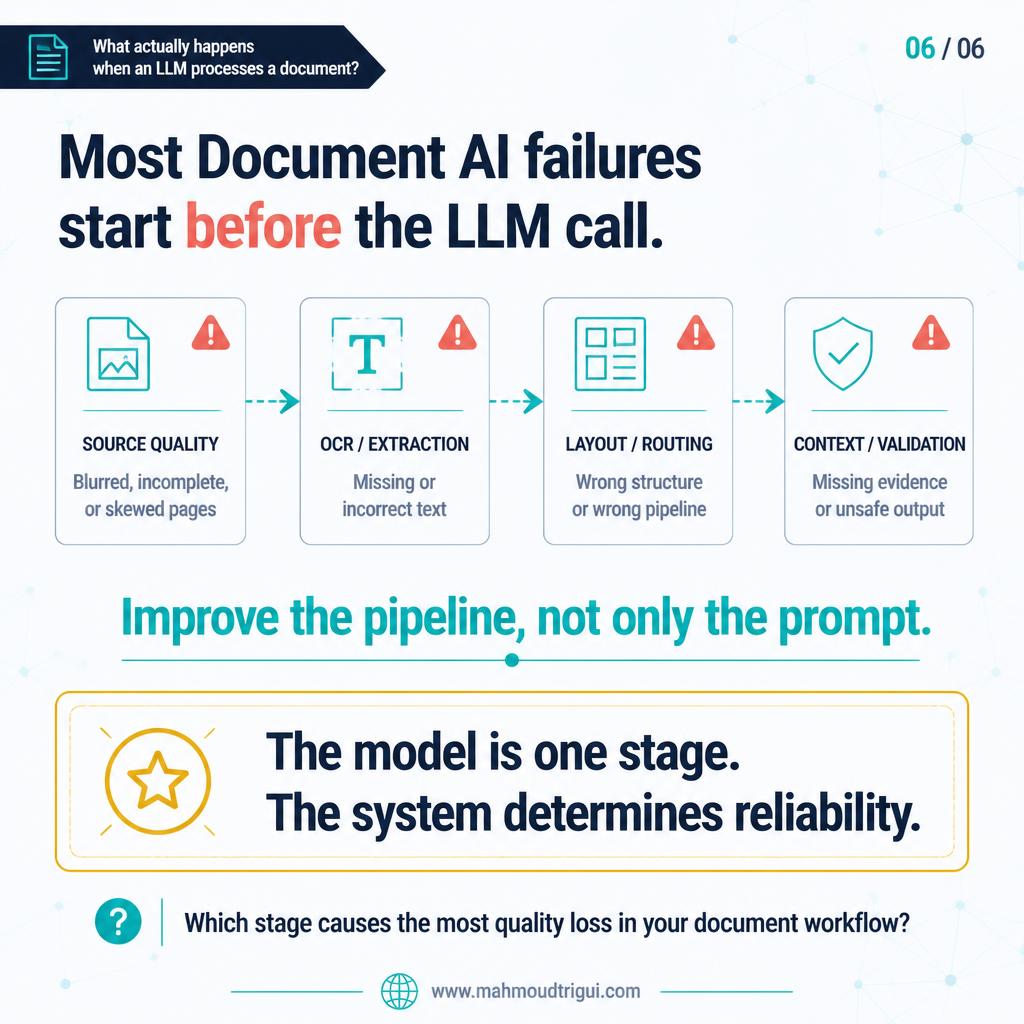
Once those stages are explicit, the failures become nameable. Poor image quality, incorrect OCR, missed table structure, wrong routing and incomplete context are five distinct bugs with five different fixes. Before, all five surfaced as one sentence: the LLM read the document wrong.
Ask where quality is lost, not which model to use
The question that pays off is not “which model should we use?” It is “where does document quality get lost before the model ever responds?” The first question points at a benchmark. The second points at a stage, a log line, and a fix someone can actually make.
Improve the pipeline before the prompt
When output quality drops, the first instinct is to rewrite the prompt. The cheaper move is to look upstream at a blurred page, a missed table header, or a document routed to the wrong extractor. Prompt work on top of a broken pipeline produces a better answer to the wrong question.
This also changes what “just use a vision model” means. Direct vision-model processing is not impossible, and for low-volume, low-stakes documents it can be the right call. But it is one option at one stage, not a substitute for deciding what the document is, what has been extracted, and whether the answer is allowed to be trusted downstream.
In production, the model matters. The pipeline around it matters just as much, and it is the part that is still usually left implicit.
Key Takeaway
Design insight: Document understanding is a pipeline, not a model call. Most Document AI failures are created before the LLM is ever invoked: poor source quality, wrong OCR, lost table structure, incorrect routing, and incomplete context. In production the model matters, but the stages around it — ingest, extract, understand layout, route, construct context, validate — decide whether its answer can be trusted at all.
Related
Document AI Starts Before Extraction: Route First → Structured Outputs for Reliable LLM Pipelines → An AI Endpoint Is a Workflow Contract, Not Just a Response → LLM Fallback Strategy: What Happens When the Model Fails? → A Valid LLM Response Is Not Necessarily a Safe Decision → 5 Signs Your AI Architecture Is Not Production-Ready → Stable vs Changing LLM Context - Cache and Retrieve Strategically → Late Fusion for Multimodal Data: Represent Every Modality Well → Preprocessing Is Vocabulary Design for Noisy NLP Text → The prompt that classifies 500 images without training a model →